 Occazora
Festive gathering · Diwali · Holiday dinner
Festive dinners and holiday gatherings, without phone-tag
Invite every family with a private link. They RSVP with head count, see the time and address, and you run the evening—from menu orders to a thank-you note after.

How it works
Name your celebration
Tap Start my celebration, choose the occasion and its picture, and add the date, time, and address.
Add your families
Type each family, or paste your whole list from Excel or Google Sheets.
Send the private links
Tap Send next, and WhatsApp opens with that family’s invitation, ready to send.
Watch the replies come in
See who is coming and how many, answer questions, and thank everyone after the day.
Keep them for the next celebration
Save the families in your guest book. Next time, add Relatives, Friends, or everyone in one tap. Each family gets a new private link.
What hosts use it for
Head count for the table
Know how many adults and children before you plan the menu and seating.
Publish a menu guests order from
Guests pick dishes; the kitchen desk sees orders by table.
Directions and parking
The address opens in maps on each family’s page.
Same families, next celebration
Save them in your guest book and add Relatives, Friends, or everyone to the next gathering in one tap.
What guests and hosts see
Each family opens a private link on WhatsApp—not a group chat. Screens below match Festive gathering (sample layouts; your date, address, and family names are yours).
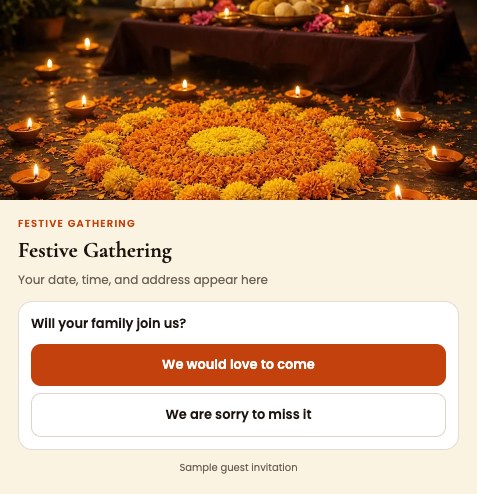
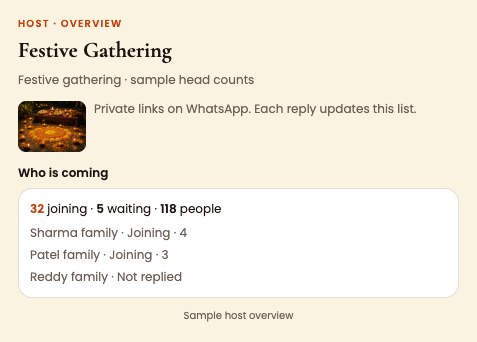
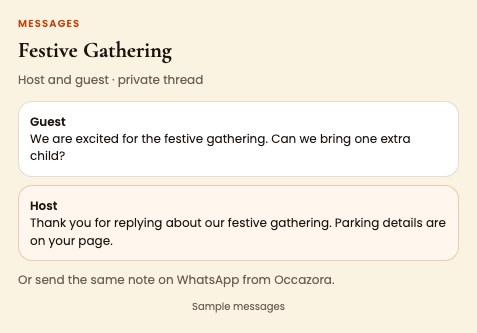
Try the sample event on your phone before you invite anyone.
Questions
Is this only for large events?
No. Any gathering where you want a real RSVP beats a group message people mute.
Do I need event manager desks?
For a dinner at home, host view is enough. Turn on Food and Transportation when the crowd or travel grows.
Free to try?
Yes. Start with one family, then ask for a bigger guest list when you are ready to invite everyone.
Ready when you are
Free to start. Your guest list stays private to your family.