 Occazora
Birthday · Milestone · Kids and adults
Birthday parties with a private page for every family
Send each family their own link on WhatsApp. They reply in one tap with how many are coming, see the time and directions, and you skip the follow-up texts asking who can make it.

How it works
Name your celebration
Tap Start my celebration, choose the occasion and its picture, and add the date, time, and address.
Add your families
Type each family, or paste your whole list from Excel or Google Sheets.
Send the private links
Tap Send next, and WhatsApp opens with that family’s invitation, ready to send.
Watch the replies come in
See who is coming and how many, answer questions, and thank everyone after the day.
Keep them for the next celebration
Save the families in your guest book. Next time, add Relatives, Friends, or everyone in one tap. Each family gets a new private link.
What hosts use it for
A head count you can trust
Every reply lists adults and children, so cake, seating, and catering match who is really coming.
One message to all guests
Parking change or time shift? Send one update that lands on every family’s page.
Food and drinks when you need them
Turn on the menu and kitchen desk for a big party at home or a hall.
Thank-yous after the party
Families send a note when they are home; you thank everyone with one message back.
What guests and hosts see
Each family opens a private link on WhatsApp—not a group chat. Screens below match Birthday (sample layouts; your date, address, and family names are yours).
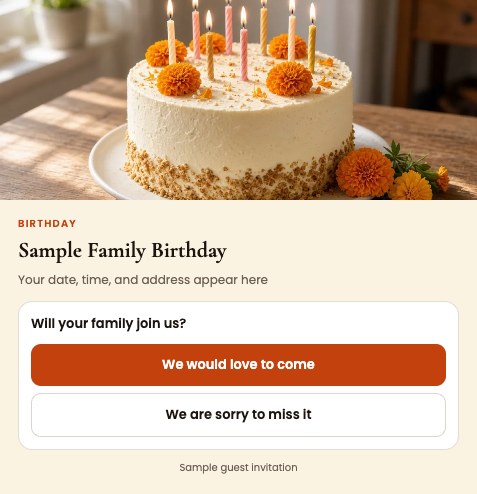
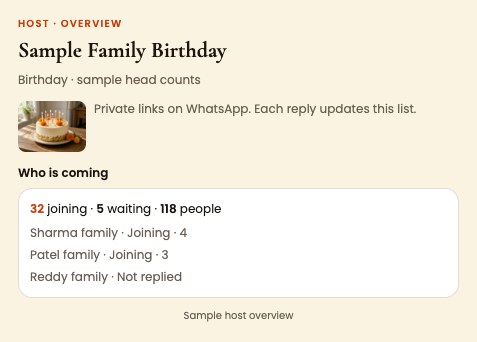
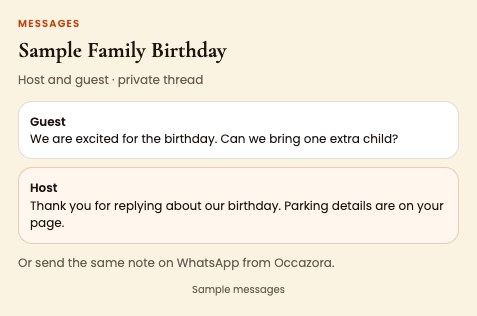
Try the sample event on your phone before you invite anyone.
Questions
Is this for a small home party?
Yes. Even ten families save you an afternoon of texting. Larger lists import from a spreadsheet.
Do guests need an app?
No. The link opens in WhatsApp or the browser. There is no password.
Can I name a custom celebration?
Yes. Choose Something else when you start and type the name, like Sweet 16 or 50th birthday.
Ready when you are
Free to start. Your guest list stays private to your family.